
Review
GitHub Copilot Pricing Review 2026: Is It Worth It?
GitHub Copilot pricing looks simple on the pricing page and gets messy the moment you start using it. The sticker prices are straightforward: $0 for Free, $10 a month for Pro, $39 for Pro+, $100 for Max, then $19 and $39 per seat for Business and Enterprise. What changed on June 1, 2026 is what those prices buy. Every plan now comes with a monthly pool of AI credits, and a long agent session can drain that pool faster than you’d expect. This review covers each plan, shows how the credit math works with real numbers, and tells you who should pay for Copilot and who shouldn’t.
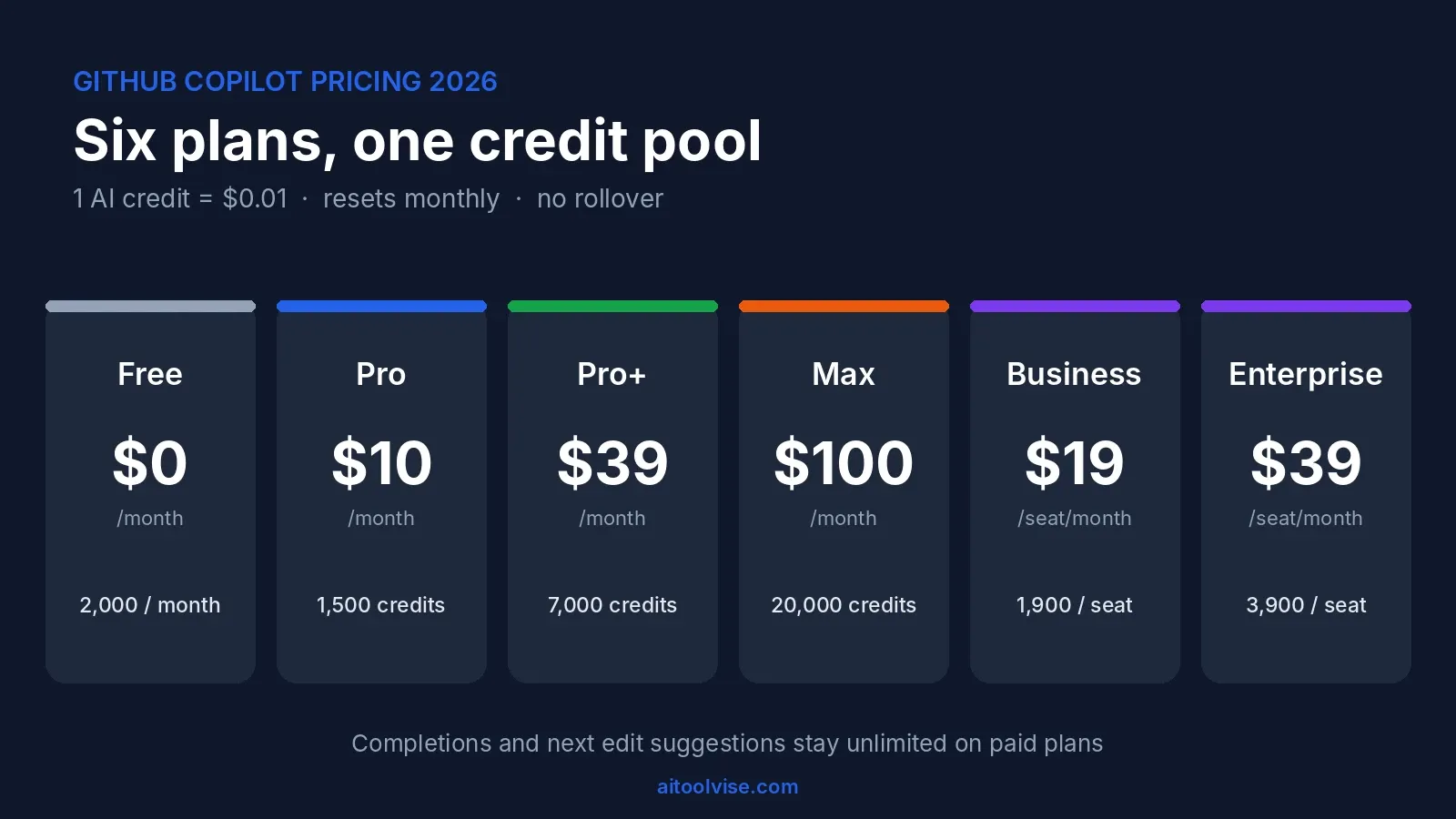
GitHub Copilot Pricing at a Glance
The short answer on GitHub Copilot pricing is that it costs between $0 and $100 a month for one person, and $19 to $39 per seat for a team. Here is every plan side by side, using the numbers from GitHub’s own plans page.
| Plan | Price | Monthly AI credits | Best for |
|---|---|---|---|
| Free | $0 | Limited (2,000 completions) | Trying it out |
| Pro | $10/month | 1,500 (about $15 of usage) | Everyday coding |
| Pro+ | $39/month | 7,000 (about $70) | Regular agent users |
| Max | $100/month | 20,000 (about $200) | Heavy daily agent work |
| Business | $19/seat/month | 1,900 per seat | Small and mid-size teams |
| Enterprise | $39/seat/month | 3,900 per seat | Large organizations |
Code completions and next edit suggestions are unlimited on every paid plan, so the credit pool only matters when you use chat, agents or code review. That’s the detail most people miss, and it’s why a $10 plan can feel generous for one developer and tight for another.
From Premium Requests to AI Credits: What Changed in June 2026
Until the end of May, GitHub Copilot pricing was built on “premium requests.” You got a set number per month, each model had a multiplier, and the bill was easy to predict. On June 1, 2026 GitHub replaced that with usage-based billing, and The Register reported that Microsoft said the product is “not the same product it was a year ago.” The pitch is that agents use far more compute than autocomplete ever did, so a flat count no longer made sense.
What an AI Credit Actually Buys
One credit equals one cent. What each request costs depends on the model you pick and how many tokens go in and out, including cached tokens. A short question to a small model costs almost nothing. A long agent session that keeps re-sending a big codebase to a frontier model can cost dollars. GitHub’s billing documentation for individuals also notes a 10% discount on model costs when you let Copilot pick the model with auto selection.
What Stays Unlimited
Completions and next edit suggestions don’t use credits on paid plans. If you mostly accept inline suggestions and rarely open chat, you may never touch your pool.
What Happens When Credits Run Out
Credits don’t roll over, and the pool resets at 00:00 UTC on the first of the month. Your own plan’s credits are used in order, base first and flex second. When they’re gone, individuals can upgrade and pay the price difference, set a USD budget for extra usage, or wait for the reset. Organizations pay $0.01 per extra credit.
GitHub Copilot Free, Pro, Pro+ and Max
All four individual plans include the Copilot CLI and the Copilot app. What changes as you go up is the credit pool and which models you can reach.
Copilot Free: What You Get for $0
Free gives you 2,000 completions a month and limited chat, with the model chosen automatically for you. Agent features are restricted, and code review is limited to reviewing a selection in VS Code. It’s enough to decide whether you like the workflow, and not enough for a full workday.
Copilot Pro: The $10 Plan Most People Should Start With
Pro removes the completion cap and gives you 1,500 credits, split into 1,000 base and 500 flex. At a cent each, that’s about $15 of usage for a $10 fee. Third-party reviews put a long Claude Sonnet agent session at around $12 in credits, so one big afternoon could eat most of the month. That’s a rough number from one reviewer’s test, not a guarantee, but it shows how fast agent work adds up.
Copilot Pro+: Seven Thousand Credits for $39
Pro+ includes 7,000 credits (3,900 base, 3,100 flex) and access to the premium models, including Opus-class options that were pulled back from the entry tier. It’s the plan for developers who use agents daily and kept hitting the wall on Pro.
Copilot Max: The $100 Tier for Power Users
Max arrived this summer for people who need more capacity. It includes 20,000 credits (10,000 base, 10,000 flex) and priority access to premium models. Availability for new sign-ups has been rolling out in stages, so check your account before planning around it.
How to Upgrade Your Copilot Plan
Upgrade from your Copilot settings on GitHub. GitHub’s docs say individuals who run out of credits can upgrade and pay the price difference. Cancellation takes effect at the end of your billing cycle, so you can downgrade without losing what you’ve already paid for.
Monthly Cost Calculator: Three Real Usage Scenarios
The simplest way to forecast your Copilot pricing bill is to ask how much of your work goes through agents. These three scenarios use GitHub’s credit values, and the dollar figures are my estimates built from reported usage, not official quotes.
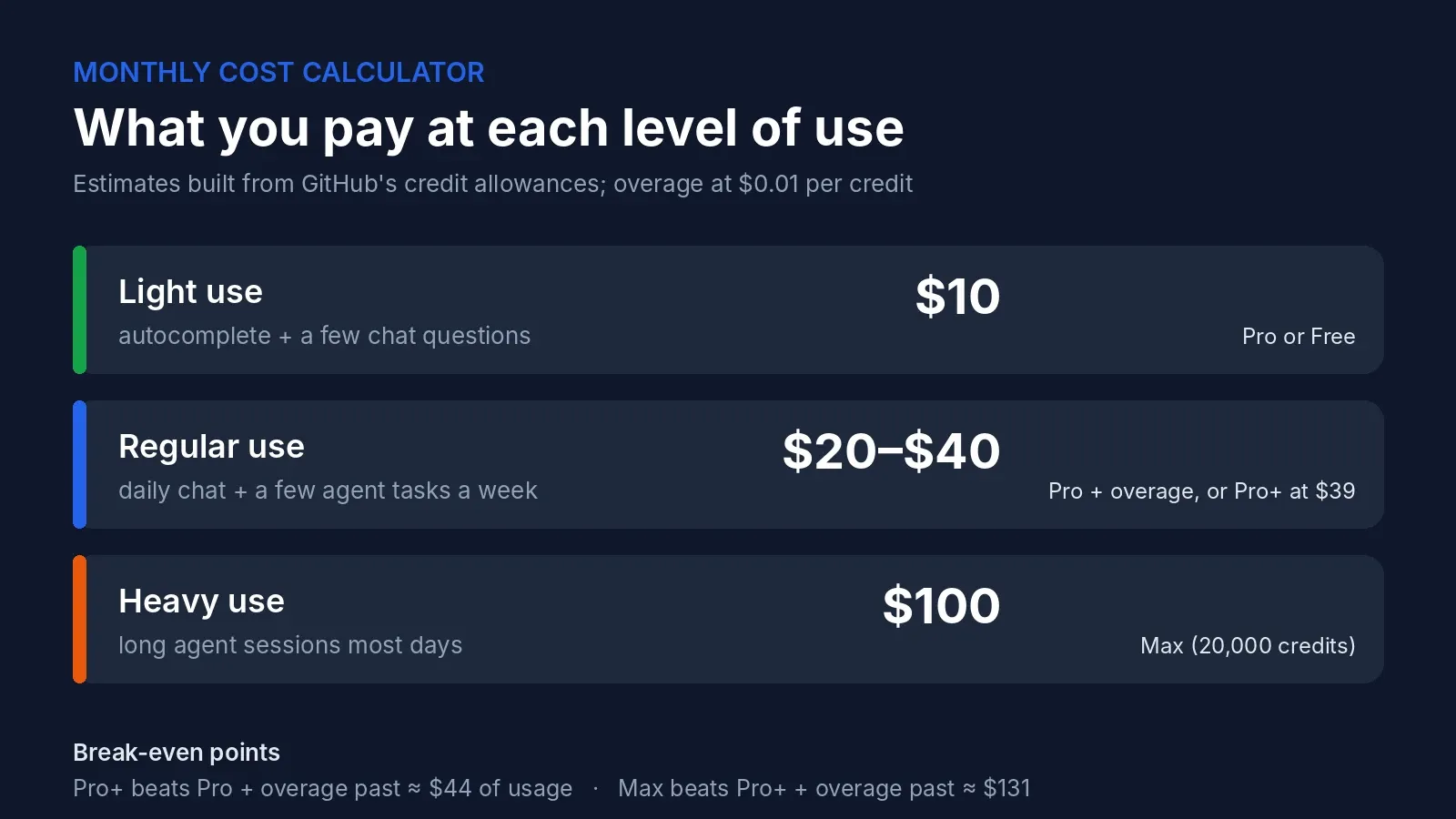
Light use: autocomplete and a few chat questions. You stay inside Pro’s pool and pay $10. Free might even cover you if you stay under 2,000 completions.
Regular use: chat every day and a few agent tasks a week. You’d probably use $25 to $45 of credits. On Pro that’s $10 plus overage, which lands at roughly $20 to $40. Pro+ at $39 gets you $70 of credits, so it starts to win here.
Heavy use: long agent sessions most days. Reports from developers range from a $12 session on one afternoon to Visual Studio Magazine’s own stress test, which projected a $180 monthly bill from a single marathon troubleshooting session. At that level Max is the only plan that makes sense.
The break-even math is simple. Pro costs $10 for $15 of credits, so overage turns it into usage minus $5. Pro+ becomes the cheaper choice once you use about $44 of credits in a month. Max beats Pro+ plus overage once you pass roughly $131. If you’re under those lines, stay on the lower plan.
Individual vs Business vs Enterprise Plans
If you’re deciding between an individual plan and a company plan, the main differences in Copilot pricing are control and billing. Business costs $19 per seat and includes 1,900 credits per user, while Enterprise costs $39 per seat and includes 3,900 per user. Both add organization policies, audit logs and centralized billing. When an organization assigns you a seat, your personal plan is cancelled automatically with a prorated refund.
How Much Does GitHub Copilot Enterprise Cost?
Enterprise is $39 per seat per month, and it needs GitHub Enterprise Cloud, which is a separate subscription. A 10-seat Business team pays $190 a month. A 50-seat Enterprise team pays $1,950 a month for Copilot alone, before the GitHub Enterprise Cloud licenses. During the transition GitHub gave Business and Enterprise customers larger promotional credits, but those ended on August 31, 2026, so the included credits are now $19 and $39 per seat.
Is Business or Enterprise Worth It?
For a team that wants audit trails and central policy, Business is the sensible default. Enterprise makes sense when you need the full GitHub Enterprise Cloud feature set anyway. If you only need to give five developers autocomplete, individual Pro plans are cheaper and give you more credits per dollar.
Copilot Student, Teacher and Open Source Access
Copilot pricing drops to zero for verified students, verified teachers and maintainers of popular open-source projects. GitHub’s free access guide explains the steps: open Copilot settings from your profile, and if you qualify there will be a button to claim access. Eligibility is rechecked every month, and you can’t cancel a grant that was given to you this way.
The student plan is not identical to paid Pro. GitHub’s plans page says it includes unlimited completions and automatic model selection but excludes third-party agents. Student users have also complained that the credit allowance is very small, with one commenter quoting around 200 credits, or about $2. Treat that figure as user-reported. If you’re in school and mostly want autocomplete, it’s still excellent value for $0.
Copilot Code Review Pricing
Copilot code review pricing changed too. Since June 1, 2026 each Copilot code review is billed twice: AI credits, and GitHub Actions minutes on private repositories. GitHub’s changelog says public repositories are not affected because Actions minutes stay free there.
GitHub doesn’t publish a flat per-review price, and the cost depends on the size of the pull request. If your team reviews dozens of pull requests a week on private repos, set an Actions budget before you turn this on everywhere. The related question, the cost of GitHub Actions itself, depends on the plan of your GitHub organization and its included minutes.
Hidden Costs in GitHub Copilot Pricing
- No rollover. Unused credits vanish on the first of the month.
- Context is the real meter. Long conversations keep re-sending earlier messages, so the same question costs more at the end of a session than at the start.
- Model choice matters more than plan choice. A frontier model can cost many times more per task than a small one.
- Actions minutes on private repos when you use code review.
- Third-party estimates disagree. Some pricing pages online still describe the old premium-request system. Check GitHub’s pages before you budget.
Why Developers Are Angry About the New Copilot Pricing
The backlash started on launch day. The Register reported a Pro+ user who used about 8% of their monthly credits in two hours, and another who said one project change cost more than $6. Forum threads kept going through the summer, and by August some users had cancelled and moved to Claude, Codex or other tools.
To its credit, GitHub kept shipping fixes. VS Code now has a spend meter, there are session limits for the CLI, user-level budgets, and an AI Usage dashboard. The billing model itself hasn’t been reversed. If you’ve been following the wider Cursor AI pricing story, you’ll recognize the pattern: flat plans turned into credit pools, and the people who lose out are the heaviest users.
Is GitHub Copilot Worth It? Who Should Pay and Who Shouldn’t
My verdict on GitHub Copilot pricing is yes for most developers, with a clear warning for agent-heavy users. At $10 a month, Pro is one of the cheapest ways to get AI help inside your editor, and unlimited completions mean the core experience never runs dry. It’s the agent workflow that makes GitHub Copilot pricing unpredictable.
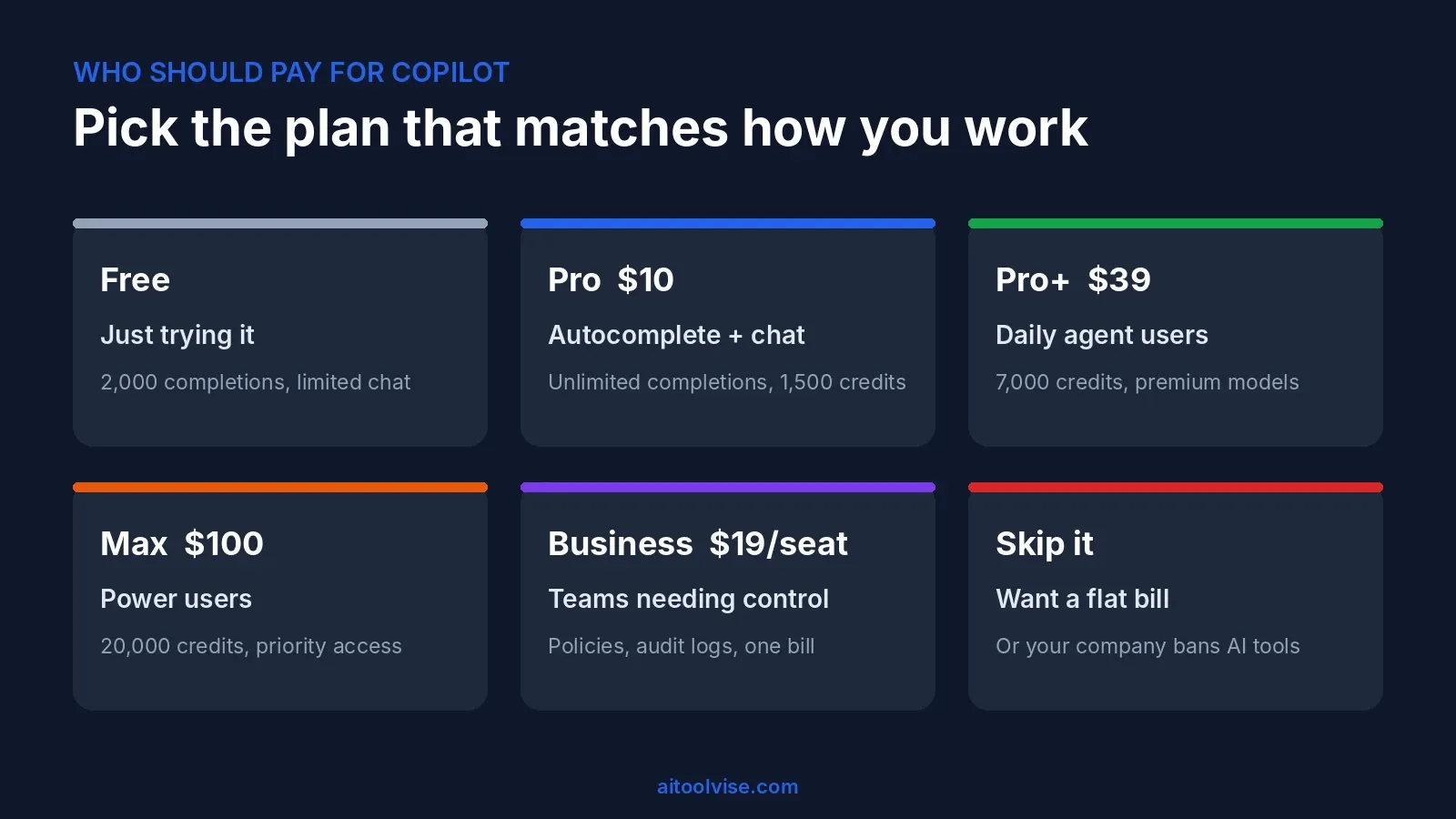
Pay for Pro if you want autocomplete, quick chat and the occasional agent task. Go to Pro+ or Max if you can see yourself using over $44 or $131 of credits a month. Choose Business if you need central billing and policies. Skip it if you want a flat monthly bill with no meter, or if your company doesn’t allow AI tools on its code.
For a head-to-head view, our Cursor vs GitHub Copilot comparison goes through features, and the best AI coding tools roundup shows where Copilot ranks overall. As a sanity check on whether anyone uses it: GitHub Copilot passed 20 million all-time users in mid-2025, according to TechCrunch, and the company says 90% of the Fortune 100 use it.
Better Alternatives to Copilot
If the Copilot pricing model doesn’t suit you, there are two obvious directions. Cursor is the AI-first editor, and our Cursor vs Claude Code comparison shows how it stacks up against terminal agents. Claude Code suits terminal-based agent work, and you can learn it from our how to use Claude Code guide. If you’re weighing the Claude plans too, the Claude pricing review covers what each tier costs. For more tools across categories, start from the AI Tool Vise homepage.
Affiliate Disclosure
Some links on AI Tool Vise may be affiliate links, which means we could earn a commission if you buy through them, at no extra cost to you. We don’t take payment for reviews, and every price in this article comes from the vendor’s own documentation or from published reports, as linked above.
Frequently Asked Questions
How much does GitHub Copilot actually cost?
On your own, anywhere from nothing to $100 a month: Free, $10 Pro, $39 Pro+, $100 Max. Companies pay $19 or $39 a seat. Here's the bit people miss, though. Since June 1 each plan comes with a pot of credits, and if you use agents a lot you'll drain it and start paying on top.
Is a GitHub Copilot subscription worth it?
I think so, if autocomplete and the odd question in chat is what you want. Ten bucks is hard to argue with. If you're planning to run agents for hours every single day, I'd pause, because that's exactly where credits disappear.
Is it worth paying extra for Copilot?
Not until you've actually hit the wall on the plan you're on. I worked it out from GitHub's own allowances. Pro+ starts beating Pro plus overage at roughly $44 of monthly usage, and Max beats Pro+ plus overage somewhere past $131. Below that, you're buying room you won't use.
What are the downsides of using GitHub Copilot?
Unused credits vanish on the 1st, no rollover. It's also tough to predict what a session will cost, since a long chat gets pricier the longer it runs. And one agent session can swallow most of a month's allowance, which surprises a lot of people.
What is the GitHub Copilot controversy?
The loud one is the June 1, 2026 billing switch. Flat premium requests became token-based credits and plenty of developers weren't happy. There's an older one as well, a 2022 lawsuit about whether training on public open-source code respected the licenses.
Why don't people like Copilot?
Mostly because of the bill. Since credits launched, Reddit and GitHub's forums are packed with people who burned through a month in a day or two. Some simply like Cursor or Claude Code better for big multi-file work. The inline suggestions still get praise, and those don't cost credits.
Why is Copilot so bad compared to ChatGPT?
I wouldn't say bad. They're built for different jobs. Copilot lives in your editor and reads your code, while ChatGPT is a chat window. Copilot even offers OpenAI models, so quality is often close. It feels worse on long agent tasks, mainly because of what they cost. Also, Google keeps mixing it up with Microsoft's Copilot, which is a different thing entirely.
Is there a better app than Copilot?
Sometimes. Want an editor built around AI? Try Cursor. Want an agent in your terminal? Claude Code. But for plain autocomplete at a low price, or if your team already runs on GitHub, Copilot is the easy pick.
Why shouldn't I use Copilot?
Skip it if you want one flat price and no surprises, if you run long agent sessions all day, or if your employer doesn't allow code to go to outside AI services. Otherwise there's a free plan, so trying it costs you nothing.
Does anyone actually use Copilot?
Loads of people. Back in July 2025 Microsoft said it had passed 20 million all-time users, with 90% of the Fortune 100 on board. Nobody publishes how many are active each month though, so I wouldn't lean too hard on that big number.
What went wrong with Copilot?
The pricing, not the product. When GitHub swapped premium-request counts for credits on June 1, heavy agent users watched their allowance drain much faster than before. Since then GitHub has added spend meters, budgets and session limits. The credit model is still here, though.
Why is Copilot not famous?
With developers it is. The problem is the name. Microsoft also calls its Windows and Microsoft 365 assistant Copilot, and that one hogs the general attention, so people looking for one often end up at the other.
What is the difference between Copilot Individual and Business plans?
Individual is one person paying their own way. Business is $19 a seat and adds admin policies, audit logs and a single company bill, plus 1,900 credits per seat each month. If your company hands you a Business seat, your personal plan gets cancelled and you're refunded for the unused part.
Is GitHub Copilot free for students?
Yes. Verified students get it through GitHub Education, and verified teachers and maintainers of popular open-source projects can get Copilot Pro free too. GitHub rechecks every month. One warning: students reportedly get far fewer credits than someone paying for Pro.
How much does GitHub Copilot Enterprise cost?
$39 a seat a month, with 3,900 credits each. What people forget is you also need GitHub Enterprise Cloud, billed separately. So the real cost per developer ends up higher than $39.
How much does Copilot code review cost?
Every review uses AI credits now, and on private repos it eats GitHub Actions minutes as well. Public repos don't pay the Actions part. There's no flat price per review, so run a few and check your billing page.
Is GitHub Copilot priced differently in the UK?
I couldn't find a separate UK price list. GitHub quotes dollars and tax like VAT may get added at checkout, so go by the total on your own billing page.