
Best Tools
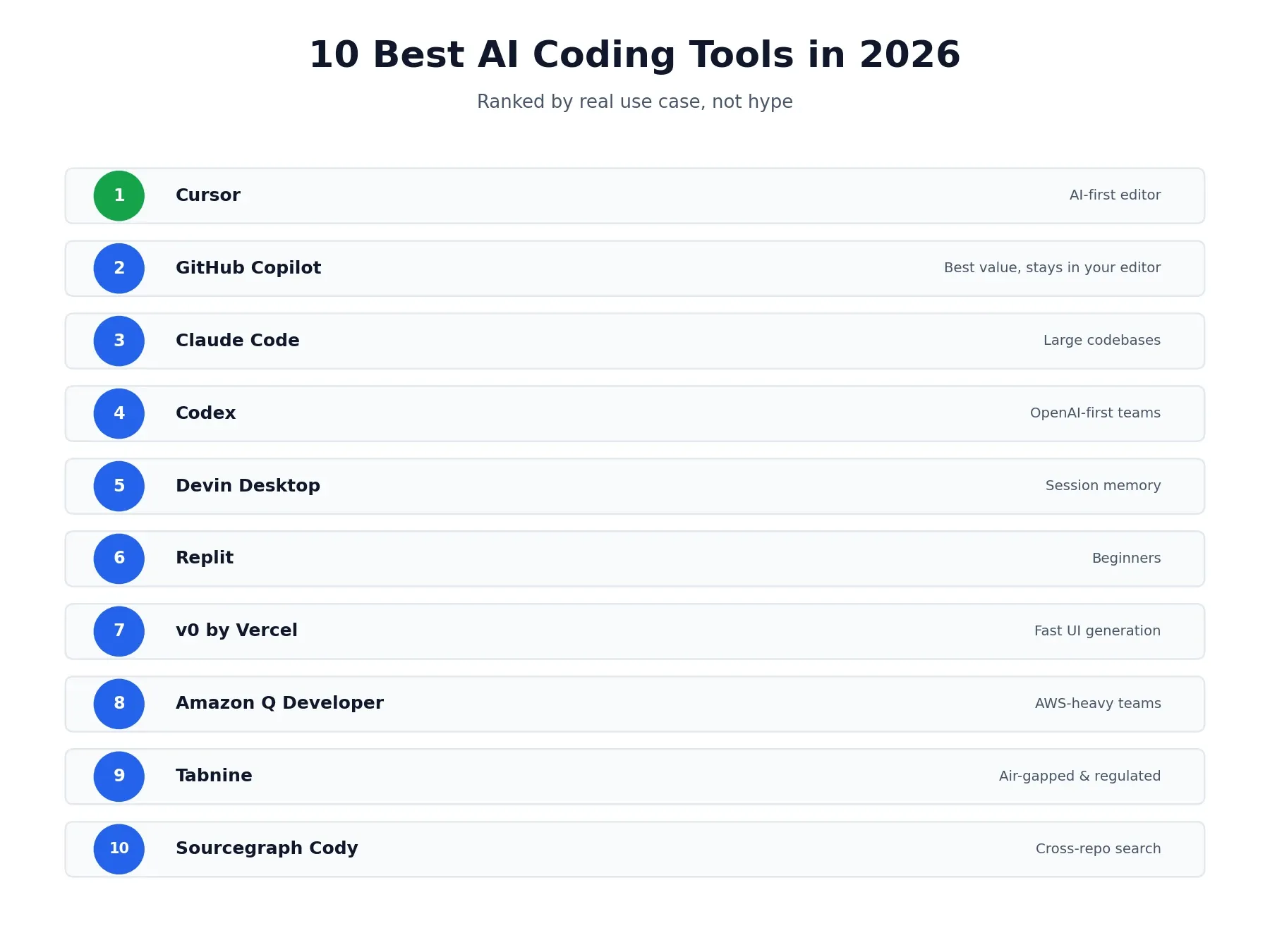
10 Best AI Coding Tools in 2026
Search for the best AI coding tools and you’ll find dozens of “top 10” lists that all recommend roughly the same five tools with the pricing already out of date. The category has genuinely split into two different kinds of tool since last year — assistants that help while you type, and agents that can take a task and run with it — and most roundups still lump everything together without explaining why that distinction actually matters for which tool you should pick. This guide ranks 10 of the strongest options in 2026, covers what free tiers really include, and points you toward the right pick based on your codebase, budget, and experience level rather than a single “best overall” that ignores how differently people actually code. If you’re building out AI tools for other parts of your workflow too, our best AI music video generators roundup covers a completely different category worth a look.
AI Coding Assistants vs. AI Coding Agents
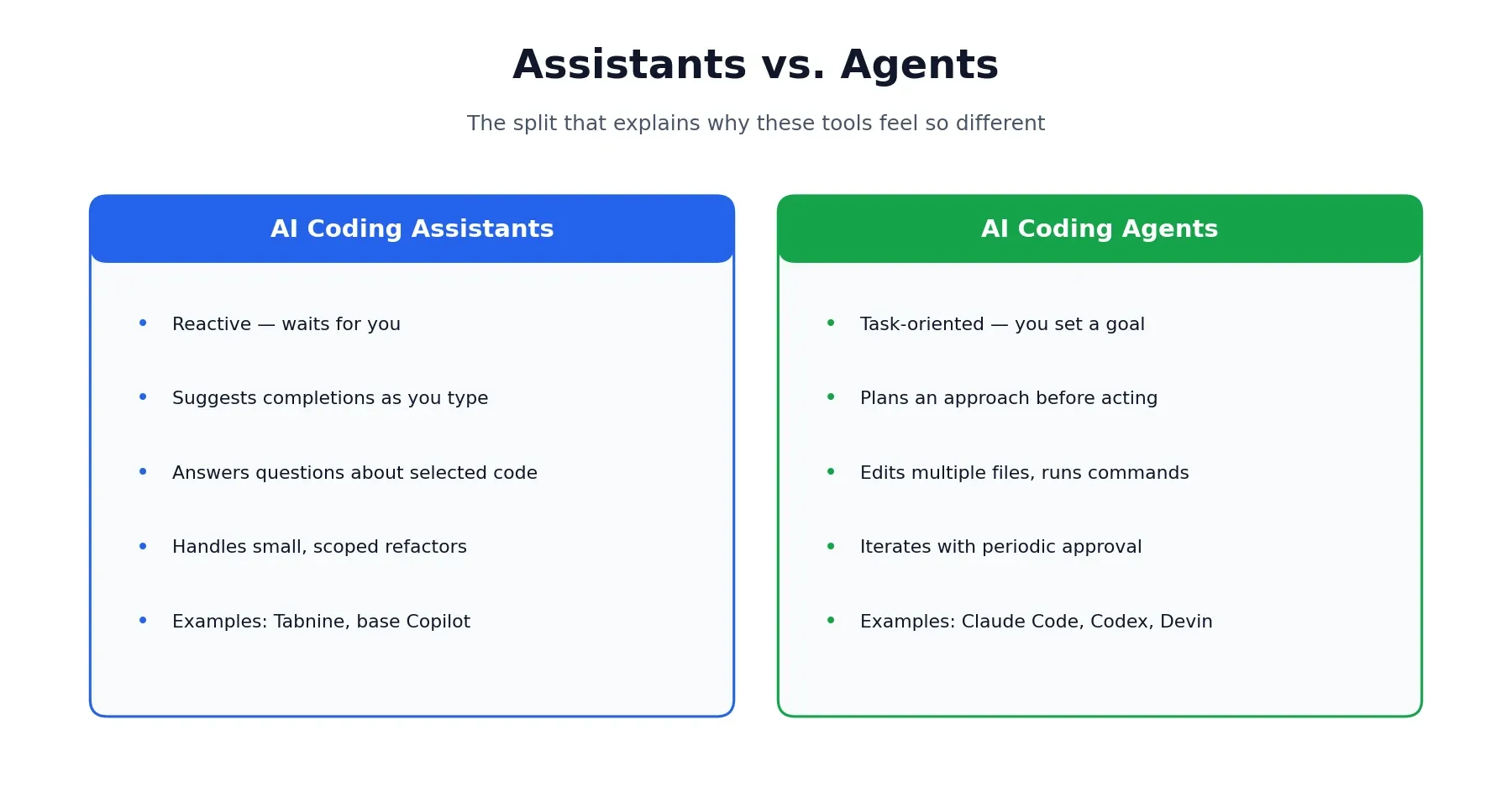
Before the list, it’s worth understanding the split, since it explains a lot about why these tools feel so different to use.
AI coding assistants are reactive. They suggest completions as you type, answer questions about code you’ve selected, and help with quick, scoped refactors — but they wait for you to drive. Tabnine and GitHub Copilot’s core autocomplete both fit here.
AI coding agents are task-oriented. Give one a goal — “add pagination to this API endpoint” — and it can inspect your repository, plan an approach, edit multiple files, run tests, and iterate on its own, checking in for approval at key points rather than every keystroke. Claude Code, Codex, and Devin Desktop all lean this way.
A lot of tools now blur the line deliberately. Cursor and GitHub Copilot both ship an assistant mode and a full agent mode in the same product, letting you choose per task. Keep that distinction in mind as you read the list below — a tool ranked lower overall might still be the better assistant, or the better agent, for what you’re actually trying to do.
How We Compared These Tools
This list is built from public pricing and documentation, hands-on testing reported across multiple independent sources, and cross-referenced reviews, current as of August 2026. AI coding tools ship new pricing tiers and model updates constantly, so treat the rankings and prices below as a strong starting point rather than a permanent scoreboard — always check a tool’s current pricing page before committing to a paid plan.
Best AI Coding Tools Compared
| Tool | Type | Best For | Entry Price |
|---|---|---|---|
| Cursor | AI-first editor | Multi-file editing, deep context | Free / $20/mo |
| GitHub Copilot | Assistant + agent | Staying in your current editor | Free / $10/mo |
| Claude Code | CLI agent | Large, unfamiliar codebases | Free / $17/mo |
| Codex | Cloud/CLI agent | OpenAI-first teams | Included with ChatGPT Plus |
| Devin Desktop (Windsurf) | AI-first editor | Session memory across projects | Free / $20/mo |
| Replit | Browser IDE | Beginners, zero setup | Free / $17/mo |
| v0 by Vercel | UI generator | Fast frontend prototyping | Free / $20/mo |
| Amazon Q Developer | Cloud assistant | AWS-heavy teams | Free / $19/user/mo |
| Tabnine | Enterprise assistant | Air-gapped, regulated environments | Free / $39/user/mo |
| Sourcegraph Cody | Code search assistant | Cross-repo semantic search | Free / $19/user/mo |
1. Cursor — Best AI-First Editor for Multi-File Work
Cursor rebuilds the editor itself around AI rather than adding it as an extension, giving it the deepest multi-file context and the most flexible agent autonomy of any tool on this list. Composer can plan and execute changes across an entire project, and a dial-able autonomy setting lets you decide how much oversight you want per task.
Where it falls short: it’s a separate editor, not a plugin, so switching means leaving VS Code, JetBrains, or whatever you use now — and its premium usage runs on a credit system that can drain faster than expected once you lean on frontier models heavily. We’ve covered both the pricing mechanics and a full head-to-head against Copilot in detail: see our Cursor pricing review and Cursor vs. GitHub Copilot comparison, and our how-to guide if you want to get productive in it quickly.
Pricing: Free Hobby plan, Pro from $20/month, scaling to $200/month for Ultra.
2. GitHub Copilot — Best for Staying in Your Current Editor
GitHub Copilot is the tool most developers reach for first, since it installs as a plugin into VS Code, JetBrains, Neovim, Xcode, or Visual Studio rather than asking you to change how you already work. Inline completions, chat, and an increasingly capable Agent Mode all live inside the editor you’re already comfortable in.
The catch: its cross-repository context still lags dedicated AI-first editors — several independent testers report it handling single-file changes cleanly but missing callers when a refactor should have touched more than one file. If you’re weighing it directly against Cursor, our dedicated comparison covers pricing, IDE support, and agent autonomy in full.
Pricing: Free tier available, Pro at $10/month, Business at $19/user/month, Enterprise at $39/user/month.
3. Claude Code — Best for Large, Unfamiliar Codebases
Claude Code is Anthropic’s terminal-first coding agent, built around a large context window that can map an entire repository without you manually selecting files. It explores dependencies, traces data flow, plans fixes, and runs tests, making it especially strong for onboarding onto a codebase you didn’t write or safely refactoring something large and tangled.
On the downside, it’s CLI-first, so there’s a real learning curve if you’ve never worked from a terminal, and the free tier is too limited for serious daily use.
Pricing: Free plan with minimal access, Pro from $17/month billed annually, Max from around $100/month.
4. Codex — Best for OpenAI-First Teams
Codex is OpenAI’s dedicated coding agent, built for delegating real chunks of work rather than quick suggestions — it reads a repository, plans, edits, runs commands, and returns results for review, available through the ChatGPT interface, a CLI, or IDE extensions.
The tradeoff is that it’s locked to OpenAI’s own models, and heavier usage tends to push you toward ChatGPT Pro or metered API pricing rather than staying inside a flat plan.
Pricing: Included with ChatGPT Plus ($20/month) and Pro ($200/month); API usage billed separately by token.
5. Devin Desktop (formerly Windsurf) — Best for Session Memory
Devin Desktop is another AI-first, VS Code-based editor, and it gets compared to Cursor constantly for good reason — they solve similar problems. Its standout feature is Devin Local, an agent mode that remembers project context across sessions, so you spend less time re-explaining your codebase every time you open a new conversation.
It’s not without rough edges, though — the community and learning resources around it are smaller than Cursor’s or Copilot’s, and some workflows still show real friction.
Pricing: Free plan with unlimited autocomplete, Pro at $20/month, Teams at $40/user/month.
6. Replit — Best for Beginners
Replit runs entirely in the browser, so there’s no local install, no terminal configuration, and no deciding on a stack before you’ve written a line of code. Describe the app you want, and its Agent asks clarifying questions before building — a small habit that’s actually useful for anyone not yet sure exactly what they’re asking for.
The flip side: it makes a lot of decisions on your behalf, which is convenient early on but can feel limiting once you have real opinions about your stack, and it offers less model choice than a local editor.
Pricing: Free Starter plan, Core from $17/month billed annually.
7. v0 by Vercel — Best for Fast UI Generation
v0 turns a plain-English description into production-ready React components with Tailwind styling, and it shows its work — a breakdown of pages and structure before any code gets written, which makes it easy to steer or hand off to a developer for cleanup.
Just don’t expect it to go beyond that: it’s explicitly a frontend tool, and complex backend logic isn’t in its lane, so most people prototype UI here and then move the project into a full editor to wire up the rest.
Pricing: Free tier with limited monthly credits, Premium from $20/month.
8. Amazon Q Developer — Best for AWS-Heavy Teams
Amazon Q Developer draws on AWS documentation, your account context, and common infrastructure patterns to give suggestions that are specific to how you actually deploy — understanding IAM roles, CloudFormation resources, and Lambda handlers in a way generic tools don’t.
Step outside the AWS ecosystem, though, and it reverts to a fairly generic assistant, so multi-cloud or non-AWS teams get much less out of it.
Pricing: Free tier with capped agentic requests, Pro at $19/user/month.
9. Tabnine — Best for Regulated, Security-Sensitive Teams
Tabnine is built around a single premise: your code shouldn’t have to leave your infrastructure to get AI assistance. It supports full air-gapped deployment, zero code retention, and fine-tuning on proprietary codebases entirely inside your own environment — a distinct value proposition from any cloud-first tool on this list.
Where it comes up short is depth: it leans toward completion-style assistance rather than real architectural reasoning, and it’s one of the pricier options here for what you actually get in raw capability.
Pricing: Free tier for basic completions, Code Assistant Platform from $39/user/month billed annually.
10. Sourcegraph Cody — Best for Cross-Repo Code Search
Sourcegraph Cody leans on Sourcegraph’s code intelligence infrastructure to answer questions grounded in your actual codebase, spanning multiple repositories rather than just the open file — ask where a specific value gets validated, and it can surface the answer along with every call site.
One limit to know going in: it doesn’t drive autonomous multi-file edits the way an agent does — you still review changes and write the glue code yourself — and full enterprise-scale indexing requires a separate Sourcegraph subscription.
Pricing: Free tier available, Business at $19/user/month, Enterprise at $39/user/month.
Best Free AI Coding Tools
If budget is the priority, several tools on this list are genuinely usable without paying anything. Cursor’s Hobby plan, GitHub Copilot’s free tier, Claude Code’s limited free access, Replit’s Starter plan, and Devin Desktop’s free plan with unlimited autocomplete all let you evaluate real fit before spending a dollar. None are “unlimited” in the way ads sometimes imply — expect monthly caps on completions or premium-model requests — but they’re solid enough to build something real and decide if a tool clicks with how you work.
Which AI Coding Tool Is Right for You?
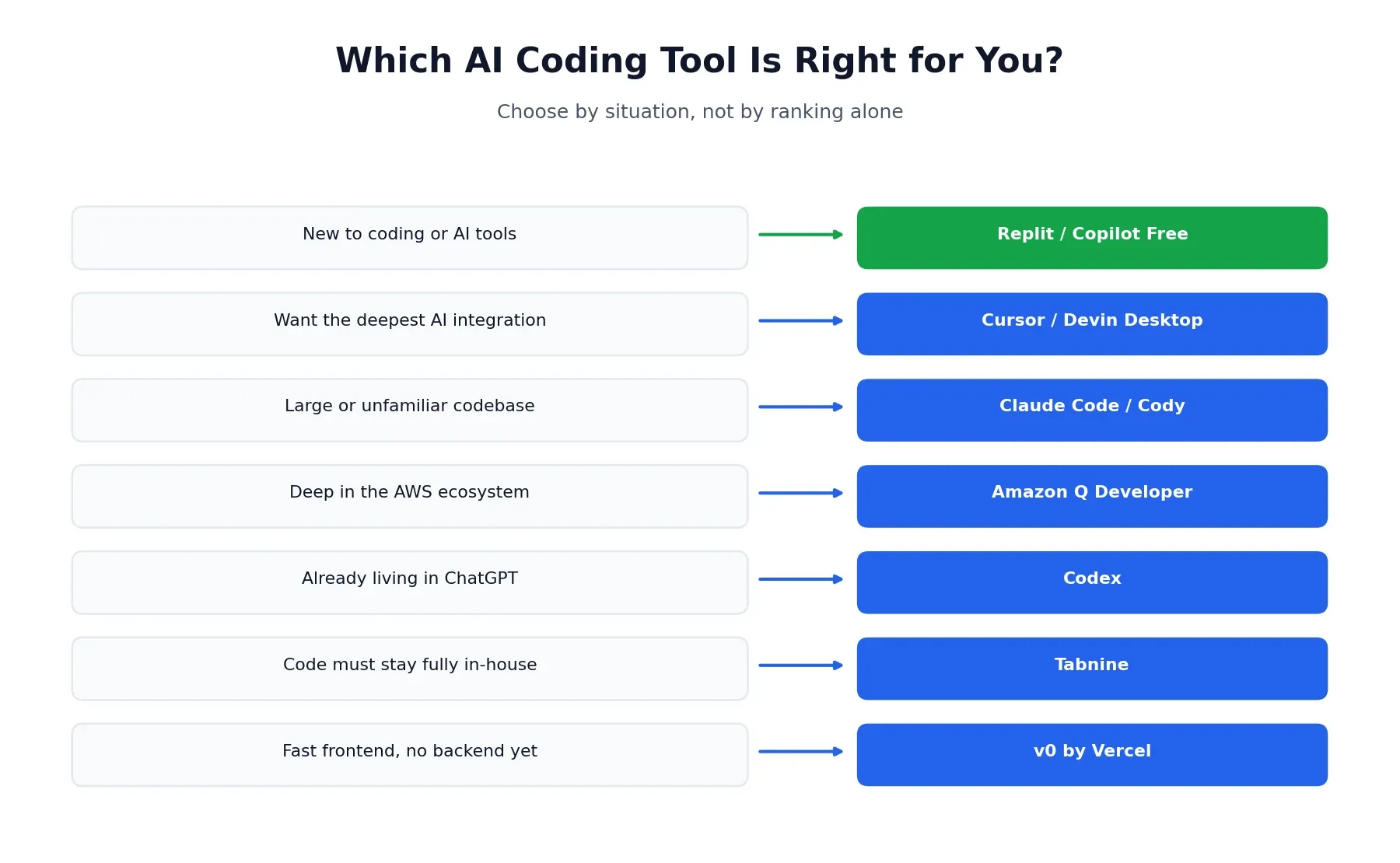
Rather than one “best overall” pick, here’s how to narrow it down by what actually matters to your situation:
- New to coding or AI tools entirely → Replit or GitHub Copilot’s free tier
- Experienced developer, want the deepest AI integration → Cursor or Devin Desktop
- Working in a large, unfamiliar, or legacy codebase → Claude Code or Sourcegraph Cody
- Already deep in the AWS ecosystem → Amazon Q Developer
- Team already living inside ChatGPT for other work → Codex
- Need to keep code fully in-house for compliance → Tabnine
- Want a fast, polished frontend without touching backend logic yet → v0
- Tight budget, need something that just works in your current editor → GitHub Copilot’s free or $10/month tier
Is ChatGPT Good for Coding?
Worth answering directly, since it’s one of the most common related questions. Plain ChatGPT is genuinely useful for explaining code, debugging a specific error, or talking through an architectural decision — but it doesn’t have direct access to your repository the way Cursor or Claude Code does, so you’re copying code back and forth rather than letting it work in place. If you want an actual coding agent inside the same ecosystem, Codex is the better tool for that job; ChatGPT itself is better thought of as a knowledgeable second opinion than a coding tool in the same category as the rest of this list.
What Does Reddit Say About AI Coding Tools?
Given how often this shows up as its own search, it’s worth summarizing honestly rather than pretending there’s one clean consensus. Sentiment is split and tool-specific rather than pointing at one universal winner: Cursor users frequently mention getting surprised by how fast a credit pool drains during heavy agent sessions, Copilot users tend to cite low switching cost and GitHub-native workflows as their main reason for staying, and Claude Code comes up often in developer threads specifically for handling large, messy codebases better than expected. A common resolution across these discussions, rather than picking one tool and sticking with it forever, is running two tools side by side and routing tasks by strength — the same pattern that shows up in real usage data across this entire category.
Best AI Coding Tools for Game Development
None of the tools on this list are purpose-built for game engines specifically, but several handle game-development languages comfortably. Cursor and GitHub Copilot both work well with C++, C#, and Lua, covering Unreal Engine, Unity, and Godot projects respectively. For sprawling game codebases with a lot of interconnected systems, Claude Code’s large context window is genuinely useful for tracing how a change in one system ripples into another.
Using Two AI Coding Tools Together
A pattern worth naming explicitly: a meaningful number of developers don’t pick one tool and stop there. A common setup is GitHub Copilot for everyday inline completions inside whatever editor you’re already using, paired with Cursor or Claude Code for heavier, agent-driven refactors and multi-file feature work — routing tasks by which tool is actually strongest at that specific job rather than forcing one tool to do everything. If you want the deeper mechanics of running both at once, including real combined pricing, that’s covered in the Cursor comparison linked above.
This roundup reflects publicly available pricing and feature information, along with independently reported testing, as of August 2026. Pricing, model access, and features across this category change frequently — always confirm current details directly on each platform before subscribing. Browse more of our AI tool guides from the homepage.
Affiliate Disclosure
This article may contain affiliate links. If you sign up for a tool through a link on this page, we may earn a commission at no extra cost to you. This helps support the research and testing that goes into guides like this one. Our opinions and recommendations are based on independent research and, where possible, hands-on use of each platform — affiliate relationships don’t influence which products we cover or how we rate them.
Frequently Asked Questions
What is the best AI coding tool in 2026?
It depends on your workflow. Cursor is the strongest pick for AI-first, multi-file editing. GitHub Copilot is the best value if you want to stay in your current editor. Claude Code leads for reasoning across large, unfamiliar codebases via the terminal.
What's the difference between an AI coding assistant and an AI coding agent?
An assistant reacts to what you're doing — suggesting completions, answering questions, explaining code — without much autonomy. An agent is task-oriented: give it a goal and it can plan, edit multiple files, run commands, and iterate with less hand-holding. Many tools, including Cursor and Copilot's Agent Mode, blend both models.
What are the best free AI coding tools?
Cursor, GitHub Copilot, Claude Code, Replit, and Windsurf/Devin Desktop all offer genuinely usable free tiers. None are unlimited — expect caps on completions or premium requests — but they're real enough to evaluate fit before paying anything.
Which AI coding tool is best for beginners?
Replit is generally the easiest starting point, since it runs entirely in the browser with no local setup and asks clarifying questions before it starts building. GitHub Copilot is a close second if you already have an editor you're comfortable in.
Is Cursor or GitHub Copilot better?
Cursor tends to go deeper on multi-file context and agent autonomy, while Copilot is cheaper and works inside the editor you already use. For the full breakdown, see our dedicated Cursor vs. GitHub Copilot comparison.
Which AI coding tool works best with large codebases?
Claude Code and Sourcegraph Cody are the strongest options here. Claude Code's large context window maps an entire repository without manual file selection, while Cody's semantic search excels at answering questions grounded in real code across repositories.
Can I use more than one AI coding tool at once?
Yes, and plenty of developers do. A common combination is GitHub Copilot for everyday inline work in your existing editor, paired with Cursor or Claude Code for heavier, agent-driven tasks — using each tool for what it's actually best at rather than forcing one to do everything.
Are AI coding tools safe for private or proprietary code?
It depends on the tool and plan. Enterprise tiers from Tabnine, Cursor Business, and GitHub Copilot Enterprise offer zero-retention policies, SOC 2 certification, and in some cases air-gapped deployment. Free and lower individual tiers typically don't offer the same guarantees, so check a tool's data policy directly before using it on sensitive code.
Is ChatGPT good for coding?
Yes, for explaining code, debugging, and architectural questions, though it lacks the direct repository access that dedicated tools like Cursor or Claude Code provide. OpenAI's Codex, built into the ChatGPT ecosystem, is the better choice when you want an actual coding agent rather than a general chat assistant.
What are the best AI coding tools for game development?
None of the major AI coding tools are built specifically for game engines, but general-purpose tools work well alongside them. Cursor and GitHub Copilot both handle C++, C#, and Lua comfortably for Unity, Unreal, and Godot projects, and Claude Code's large context window is useful for navigating big, sprawling game codebases.