
Best Tools
Best No-Code AI Workflow Automation Tools in 2026
Zapier is the easiest place to start with no-code AI workflow automation. Make is cheaper once your flows get complicated. And n8n is the one to pick if you’re comfortable with a bit of tech and want the lowest bill at volume. Those three cover most people. The other four in this list of no-code AI workflow automation tools fit narrower jobs.
I didn’t build a workflow in every tool here. This is a research roundup of 2026 pricing pages, guides and vendor docs, and I’ll say where sources disagree. Plans change often, so treat every price as a snapshot. If you run a small shop, our best AI tools for small business guide is a good companion.
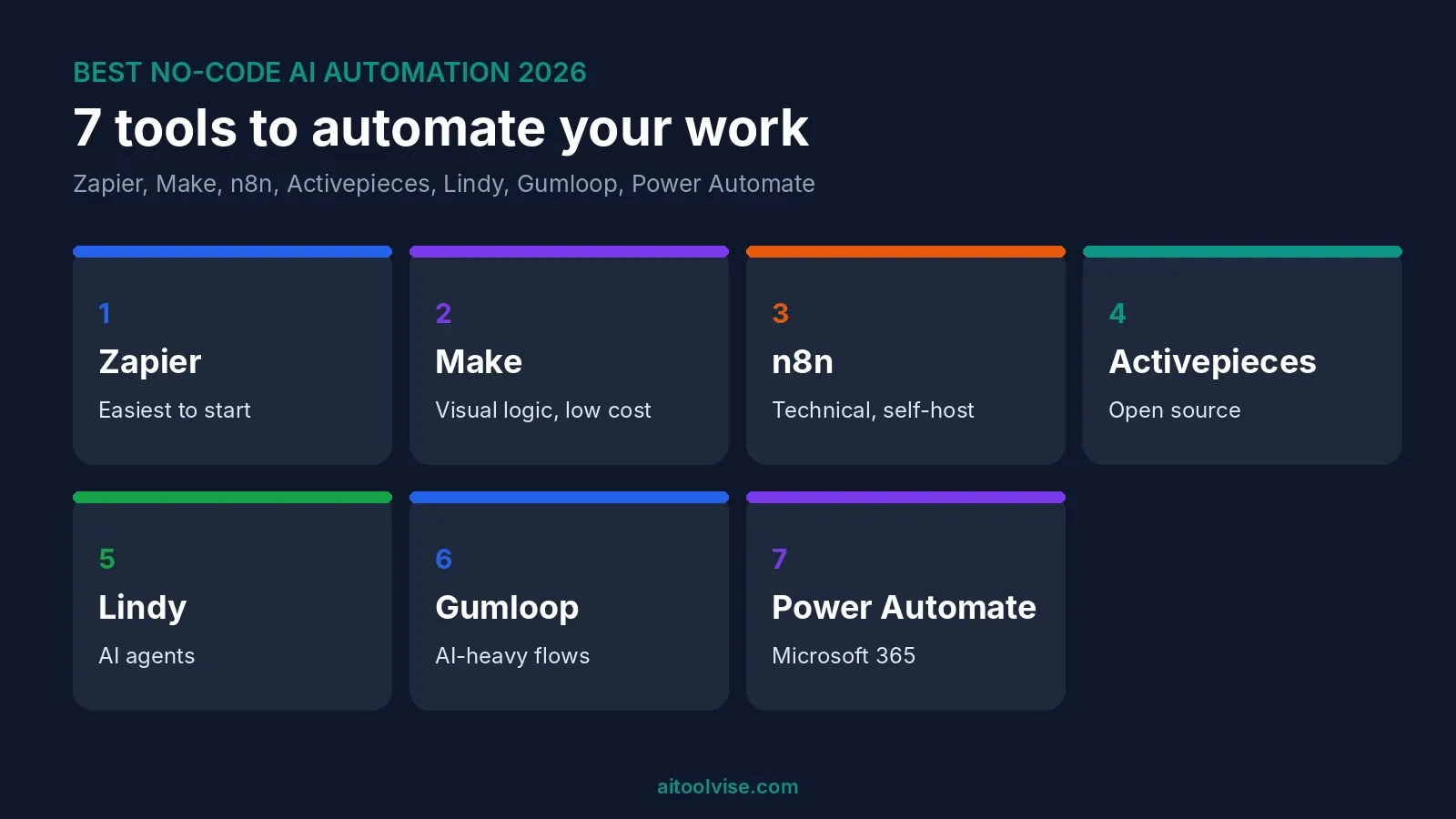
Best No-Code AI Workflow Automation Tools at a Glance
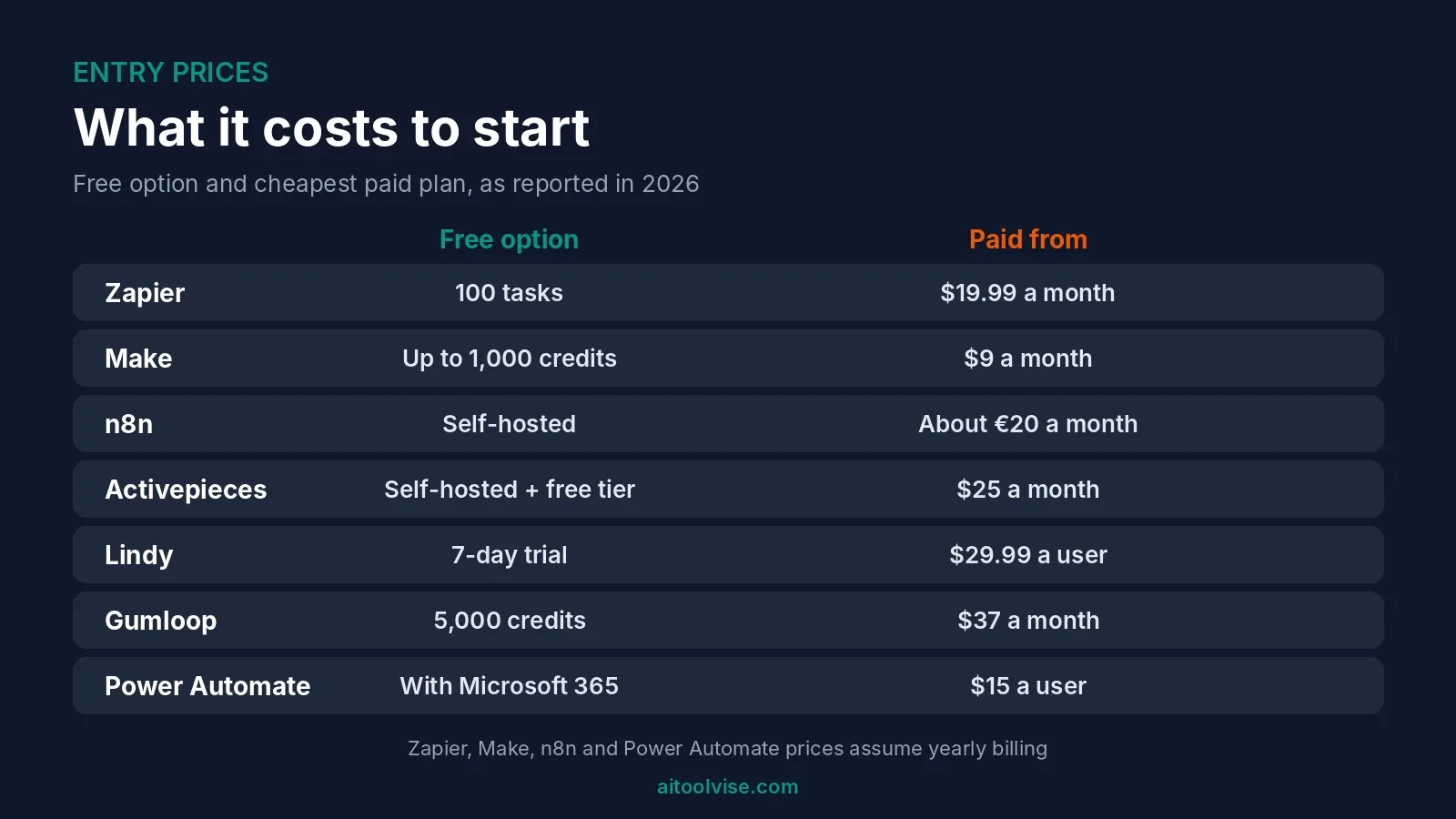
Here’s the quick view. Prices are as reported in 2026, in the currency each source used.
| Tool | Best for | Free option | Paid from |
|---|---|---|---|
| Zapier | Beginners and app count | 100 tasks a month | $19.99 a month, yearly |
| Make | Visual logic on a budget | Up to 1,000 credits | $9 a month, yearly |
| n8n | Technical teams and self-hosting | Self-hosted version | About €20 a month, yearly |
| Activepieces | Open-source simplicity | Self-hosted, plus a cloud free tier | $25 a month, per its own page |
| Lindy | AI agents | 7-day credit trial | $29.99 a user |
| Gumloop | AI-heavy workflows | 5,000 credits | $37 a month |
| Power Automate | Microsoft 365 shops | Free with Microsoft 365, standard connectors | $15 a user, yearly |
Most figures come from Dupple’s workflow automation roundup, updated November 2026 and vendor-neutral pricing guides. Check each company’s own page before paying.
How to Choose a No-Code AI Workflow Automation Tool
Ask three things. How many steps will your flows have? How often will they run? And do you want an app that follows rules, or one that works toward a goal?
Tasks, credits and executions are not the same thing
This trips people up. Zapier bills in tasks. Make now bills in credits. n8n bills one execution per full workflow run, no matter how many steps it has, per one 2026 comparison. So a 20-step flow can cost 20 times more on one tool than another. Honestly, that’s the biggest reason your bill surprises you.
1. Zapier: Best for Beginners and App Count
Zapier has the lowest learning curve. One guide says you can grasp it in about ten minutes. It has a free plan with 100 tasks a month and two-step Zaps. Professional starts at $19.99 a month billed yearly, or $29.99 monthly, per Jet Admin’s September 2026 pricing guide. Team starts at $69 a month yearly for up to 25 users.
AI is built in. Copilot helps build Zaps, and AI fields sit on Professional. Agents and Chatbots are separate add-ons, and they draw from the same task pool when they act. Jet Admin sells a rival product, so I’d double-check its comparisons.
The catch is volume. Dupple notes overages bill at 1.25 times. If you run thousands of tasks, look at Make or n8n.
2. Make: Best for Visual Logic on a Budget
Make is the visual one. You drag modules onto a canvas and branch them. Core is $9 a month yearly ($10.59 monthly) with 10,000 credits. Pro is $16 and Teams $29, and per Jet Admin those tiers add priority, bigger files and collaboration, not more credits.
The free plan gives up to 1,000 credits. That’s a ceiling, not a promise. Make renamed operations to credits in August 2025, and most module actions cost one credit. AI modules can cost more, and a couple of sources didn’t say how much. Check before you build something heavy.
It’s steeper than Zapier. One test had a Slack-to-Airtable scenario live in about ten minutes, though. And loops can multiply cost, because each item runs the steps after it.
3. n8n: Best for Technical Teams and Self-Hosting
n8n has no permanent free cloud plan, just a 14-day trial. Cloud Starter was about €20 a month yearly with 2,500 executions. Pro was €50 with 10,000 executions and 150 AI credits, per Hackceleration’s 2026 n8n vs Make comparison. The free route is the self-hosted Community Edition, with unlimited executions.
Self-hosting isn’t free, though. You pay for a server, which that source puts around €5 to €15 a month, and you maintain it. It also uses a Sustainable Use License, not a fully open one.
AI is where n8n shines. Hackceleration counts over 70 AI nodes built on LangChain and native MCP support. It also says juniors took closer to three hours to feel comfortable. And its Business tier figures conflict between pages, so confirm on n8n’s site.
4. Activepieces: Best for Open-Source Simplicity
Activepieces is MIT-licensed and free to self-host. Its own page, Activepieces’ n8n comparison, lists a free cloud tier with 1,000 tasks and 200 AI credits. It also lists a Basic plan at $25 a month with unlimited executions and 10 active flows.
That’s vendor marketing, published July 2025 and edited in October 2026. So I wouldn’t take the speed or ease claims as fact. It also counts tasks on one plan and executions on another, without defining either. Still, the vertical step builder looks friendlier than n8n’s canvas. It’s one to try free.
5. Lindy: Best for AI Agents
Lindy works differently. You describe a goal and the agent figures out the steps. There’s no permanent free plan, just $50 in credits that last seven days. Plus is $29.99 a user with 3,000 credits. Pro is $99.99 with 15,000, and Max $199.99 with 35,000, per Layer3 Labs’ Lindy pricing guide.
Credits are the catch. Basic steps use about one to three. Big reasoning steps use about ten. Top-ups are $10 per 1,000. Dupple lists a Team plan at $49.99 a user instead, so the sources disagree. Dupple also says costs are hard to predict and that customer or money tasks need guardrails. I’d keep an agent away from payments.
6. Gumloop: Best for AI-Heavy Workflows
Gumloop is built around AI blocks. Dupple lists Pro at $37 a month with 20,000-plus credits, and a free plan with 5,000 credits. It says you can switch models per node across GPT, Claude, Gemini and DeepSeek. It also lists about 130 native integrations, far fewer than Zapier.
I only found one source with these numbers, so verify them. Credits get expensive with premium models. It suits people whose flows are mostly AI steps rather than moving data between apps.
7. Microsoft Power Automate: Best for Microsoft 365 Shops
If your company lives in Microsoft 365, Power Automate may already be paid for. Dupple says it’s free on standard connectors for Microsoft 365 users. Premium is $15 a user a month yearly. There’s also a $500 a month Per Flow plan for five flows.
Licensing is messy. Dupple calls it “a maze” and says it feels heavy outside Microsoft. AI Builder uses its own credits. For a Google or Slack team, I’d pick something else.
Best Free AI Workflow Automation Tools
Free plans for no-code AI workflow automation are real, but small. Zapier gives 100 tasks. Make gives up to 1,000 credits. Gumloop lists 5,000 credits, and Activepieces says 1,000 tasks. Lindy’s is a seven-day trial, not a plan.
Open-source AI workflow automation tools
Two stand out. n8n’s Community Edition and Activepieces both self-host for free. You still pay for the server and your time. And n8n’s license limits some uses, so read it first.
AI automation tools with no restrictions
Nothing free is unlimited. Self-hosting removes execution caps, but adds a server bill and upkeep. Everything else has a cap somewhere. If a site promises otherwise, I’d be careful.
Best AI Automation Testing Tools
This is a different job. Testing tools check that your software works, not move data between apps. I haven’t used any of them. TestCollab’s roundup is the one I leaned on, and it ranks its own product first, so weigh it.
Katalon covers web, mobile and API testing, from $70 a seat a month with no free plan, per that guide. Testim has a free Community tier and is low-code. Mabl is low-code, with a 14-day trial and custom pricing. Functionize lists a free tier with 200 credits, and Autify has a free tier for individuals and is no-code. Several vendors don’t publish prices at all, so costs are hard to compare.
Questions About No-Code AI Tools
Which AI is best for non-coders?
For automations, Zapier or Make. For writing and everyday tasks, ChatGPT or Claude. Our ChatGPT vs Claude comparison helps you pick between those two.
What are some good no-code tools for AI development?
Gumloop and Lindy are the two here built around AI. n8n and Activepieces suit people willing to learn more. For building an app by chat, our best AI coding tools roundup covers vibe-coding options like Replit and v0.
Which AI is number 1 in coding?
No single winner. Cursor, GitHub Copilot and Claude Code lead most lists I’ve seen, including ours. Our guide to using Claude Code is a good start if you’re curious.
Can ChatGPT write its own code?
It can write code for many tasks, yes. It can also get things wrong, so run and test whatever it gives you. If you only want a one-off script, it’s often enough.
Which AI tool is better than ChatGPT?
Depends on the job. Claude is often preferred for writing and coding, and Gemini fits Google apps. We cover that in Claude vs Gemini.
Tools I Left Out
Relevance AI is an agent platform. Layer3’s guide, updated September 2026, lists a free tier, Pro at $29 monthly and Team at $349. But it says the free allowance is unclear, so check. Relay.app suits approvals, and Workato is enterprise-only and sales-led. One pricing guide says part of Pipedream is closing, though I couldn’t confirm that, so I skipped it.
Which Should You Start With?
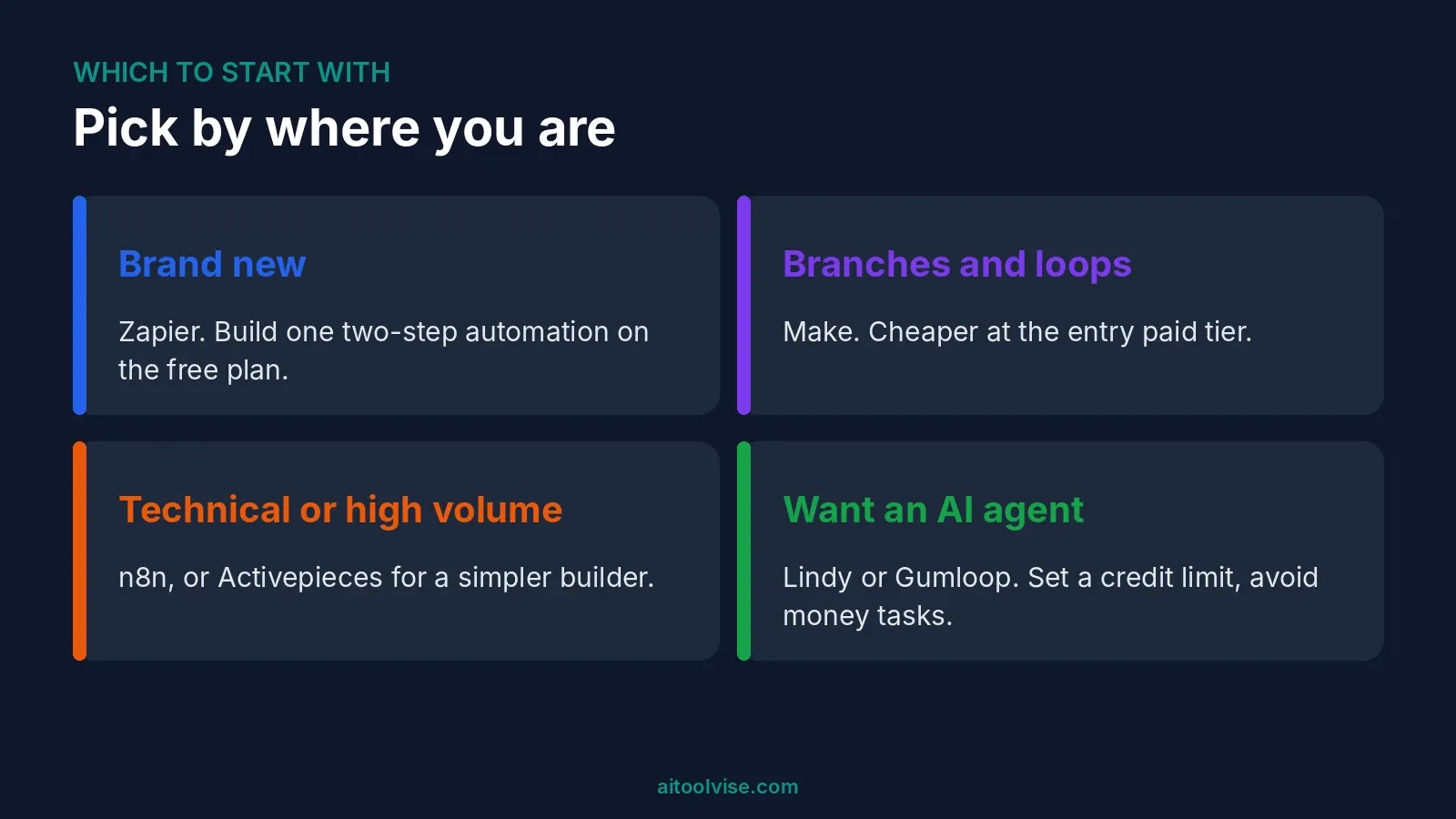
If you’re brand new
Zapier. Start on the free plan and build one two-step automation.
If your flows have branches and loops
Make, because it’s cheaper at the entry paid tier.
If you’re technical or watching costs at volume
n8n, or Activepieces if you want a simpler builder.
If you want an agent that works toward a goal
Lindy or Gumloop. Set a credit limit first. And keep them away from money.
Where to Start With No-Code AI Workflow Automation
Pick one no-code AI workflow automation tool and one boring task. Something like saving email attachments to a folder. Run it on a free plan for a week. If it works, then think about paying. For more tools to pair with it, see our best AI tools for content creation roundup, or browse the home page.
Affiliate Disclosure
Some links on this page may be affiliate links. If you sign up through one, AIToolVise may earn a commission at no extra cost to you. We only recommend tools we’d point a friend toward, and the opinions are ours. Prices and plans shift a lot, so check each company’s own pricing page before buying.
Frequently Asked Questions
Which AI tool is best for workflow automation?
Zapier, if you're new. It's the easiest. Make costs less once flows branch, and n8n suits people who don't mind tinkering. I haven't built the same flow in all three, so I'd test free plans first.
What are the best AI-enabled no-code automation platforms?
Zapier, Make, Lindy, Gumloop and Activepieces all add AI and need little or no code. n8n has the deepest AI nodes, but it's more technical. Power Automate suits Microsoft shops.
Which AI is best for non-coders?
Depends what you're doing. Automations? Zapier or Make. Writing or everyday questions? ChatGPT or Claude. Pick the job first, then start on a free plan.
What are some good no-code tools for AI development?
Gumloop and Lindy are built around AI steps. Zapier and Make bolt AI onto normal flows. If you want to build an app by chatting, Replit and v0 show up in our coding roundup.
What are the top 10 no-code platforms?
I can't honestly give you ten. I only looked at automation tools. Those are Zapier, Make, n8n, Activepieces, Lindy, Gumloop and Power Automate. Relevance AI, Relay.app and Workato are the extras.
What are the top 5 AI tools for coding?
Cursor, GitHub Copilot, Claude Code, Codex and Replit turn up most. Our coding roundup covers ten. Rankings shift fast, so don't treat any list as final.
Which AI is number 1 in coding?
Nobody agrees. Cursor, GitHub Copilot and Claude Code lead most lists I've read. Results change with your language and project size, so try one on your own code.
Can ChatGPT write its own code?
It writes code, yes. For small scripts that's often plenty. But it slips up sometimes. Run whatever it hands you and test it.
Which AI tool is better than ChatGPT?
Depends on the task. Claude gets picked a lot for writing and coding. Gemini is handy with Google apps. Perplexity is better when you want sources. None of them wins everywhere.
Best no-code AI workflow automation tools free: which are free?
Zapier gives 100 tasks a month. Make gives up to 1,000 credits. Gumloop lists 5,000. n8n and Activepieces are free if you host them yourself. Lindy is only a seven-day trial.
AI workflow automation free: is there a truly free option?
Self-hosting n8n or Activepieces costs nothing for the software. You still pay for a server, and for your own time. Hosted free plans all have monthly caps.
Best free AI workflow automation tools: which should I try first?
Zapier if you're new. Make if you like branching logic. Activepieces if open source appeals. Whichever you choose, run one simple task for a week.
Best no-code AI workflow automation tools reddit: what do users say?
I didn't use Reddit for this one, so I can't tell you. Pricing moved a lot in 2025 and 2026, so stick to recent threads if you go looking.
Open-source AI workflow automation tools: which are there?
I covered two. Activepieces is MIT-licensed. n8n uses a Sustainable Use License with some limits, so read it before you build anything on it.
Best AI workflow automation tools: what is the difference between them?
Zapier is easiest and has the most apps. Make is more visual. n8n is technical and cheaper at volume. Lindy and Gumloop lean on AI. Each bills differently, so compare carefully.
No-code automation tools: what are they?
Apps that connect other apps and move data around without code. You build with visual blocks. Many now add AI steps too, like summarizing an email or drafting a reply.
AI automation tools with no restrictions free: do they exist?
Not really. Every free plan has a cap somewhere. Self-hosting removes the run limits but adds a server bill and upkeep. If a site promises unlimited and free, I'd walk away.
No code AI workflow automation tool: which is easiest?
Zapier, by most accounts. One guide says about ten minutes to get the idea. Make starts quickly too, but gets harder once the logic does.
No code AI workflow automation tools for YouTube: what can I automate?
I didn't test YouTube flows, sorry. Saving video notes to a doc or posting a summary to social are the usual ideas. Any tool here that links your apps could handle them.
Best AI automation tools: which are best for a small business?
Zapier, usually. It's easy and has a free plan. Make is cheaper if your flows branch. Our small business guide covers the wider AI stack.
Best AI tools for workflow automation: should I use an AI agent?
Only for low-risk jobs. Agent tools like Lindy work toward a goal, and credit costs are hard to predict. Keep them away from payments and customer messages.
What are the best AI workflow automation tools?
The seven I covered are Zapier, Make, n8n, Activepieces, Lindy, Gumloop and Power Automate. Which one's best comes down to your skills, your volume and your apps.
Best AI automation testing tools: which are there?
Katalon, Testim, mabl, Functionize and Autify show up in one 2026 roundup. It comes from a rival vendor, and I haven't tried any of them. Several don't publish prices.
Is Zapier free?
Yes. The free plan gives 100 tasks a month and two-step Zaps. Paid starts at $19.99 a month billed yearly, or $29.99 monthly. Check Zapier's own page.
Zapier vs Make: which is better?
Zapier is easier to learn. Make is cheaper for complicated flows. I haven't run them side by side, so try a free plan on each.
Is n8n free?
The self-hosted Community Edition is, though you pay for the server. The cloud version is a 14-day trial, not a free plan, per one 2026 comparison.
How do Make credits work?
Most module actions cost one credit, per Make's pricing as one guide quotes it. Loops multiply that. AI modules can cost more. Check each module's rate.
Is Lindy worth it?
Maybe, for simple agent jobs. Plus is $29.99 a user with 3,000 credits. Costs are hard to predict and sources disagree on plans, so use the trial first.